GenAI - Prompt Engineering
Table of contents
- Prompt Engineering
- What is Prompting?
- Designing a Prompt: A 5-Step Framework
- Multimodal Prompting
- Major Issues When Using AI Tools
- Using AI Responsibly
- Design Prompts for Everyday Work Tasks
- Speed Up Data Analysis
- Building Presentations
- Use AI as a Creative or Expert Partner
- Rules to Prompt Engineering
- Parameters
- Image Generation
Prompt Engineering: Unlocking the Power of Generative AI
What is Prompting?
Prompting is the process of providing specific instructions to a generative AI tool to receive new information or to achieve a desired outcome on a task. This interaction can encompass various modalities, including:
- Text
- Images
- Videos
- Audio
- Code
The quality and structure of the prompt often directly influence the relevance and usefulness of the AI-generated output.
Designing a Prompt: A 5-Step Framework
Creating an effective prompt is essential for achieving high-quality results from generative AI tools. Here is a 5-step framework to guide you:
1. Task
Define what you want the AI to do. For example:
- If your friend’s birthday is approaching and they’re really into anime, you could start with:
“Suggest a gift related to anime for my friend’s birthday.”
While this prompt might yield decent results, you can make it more unique and specific by incorporating two additional elements:
-
Persona: Define the role you want the AI to embody. For example:
“Act as an anime expert to suggest an anime gift for my friend’s birthday.”
This adjustment leads to more specific results, potentially categorized by different genres. -
Output Format: Specify the desired format of the response. For instance:
“Organize that data into a table.”
2. Context
Provide as much relevant information as possible. More context typically leads to better outputs. For example:
“Act as an anime expert to suggest an anime gift for my friend’s birthday. She is turning 29 years old, and her favorite animes are Shangri-la Frontier, Solo Leveling, and Naruto Treasures.”
This additional context helps the AI tailor its suggestions more precisely.
3. References
Include examples to clarify your expectations. If explaining your requirements in words proves challenging, examples can help. For instance, share past birthday presents that the person enjoyed to guide the AI in crafting suitable suggestions.
4. Evaluate
After receiving the AI’s output, ask yourself: “Is this result aligned with what I wanted?” If it isn’t, proceed to the next step.
5. Iterate
Prompting is rarely a one-and-done process. It’s an iterative cycle where you refine the prompt to achieve the desired results. Here are four effective methods for iteration:
-
Revisit the Prompting Framework: Consider adding more references, providing additional examples, offering more context, or introducing a persona if you haven’t already.
- Separate Prompts into Shorter Sentences: Simplify complex instructions into smaller, manageable parts. For example:
- Instead of:
“Summarize the key data points and information in the report. Then create visual graphs from the data and shorten the key information into bullets.” - Try:
“1. Summarize the key data points and information in the report.
2. Create visual graphs with the data you summarized.
3. Shorten the key information you summarized into bullets.”
- Instead of:
-
Try Different Phrasing or Analogous Tasks: If the output feels dull or uninspired, reframe the task. For example, instead of asking for a marketing plan, try:
“Write a story about how this product fits into the lives of our target customer demographics.”
This can lead to more engaging and creative results. - Introduce Constraints: Narrow the focus by specifying constraints. For example:
- Instead of:
“Generate a playlist for a road trip.” - Add constraints like:
“Only use Brazilian music.”
“Only include chilled and adventurous tempos.”
“Only songs about heartbreak.”
- Instead of:
Mnemonic to Remember Iteration Methods
Use the phrase “Refine Sentences And Constraints Thoughtfully” to recall these methods:
- Revisit the Prompting Framework
- Separate Prompts into Shorter Sentences
- Analogous Tasks and Different Phrasing
- Introduce Constraints
Mnemonic to Remember the Framework
Use the phrase “Thoughtfully Create Really Excellent Inputs” to recall the 5-step framework:
- Task
- Context
- References
- Evaluate
- Iterate
Multimodal Prompting
Multimodal prompting expands the interaction beyond text, allowing generative AI tools to process and generate outputs in various modalities such as images, audio, video, and code. Many advanced AI models, like Gemini, support these capabilities. This doesn’t fundamentally change the principles of effective prompting but requires careful specification of inputs, outputs, and context.
For example, if you designed a new nail art collection and want to market it on social media, you could input:
“Write a social media post featuring this image. The post should be fun, short, and focus on the fact that it’s a collection of new designs I’m selling.”
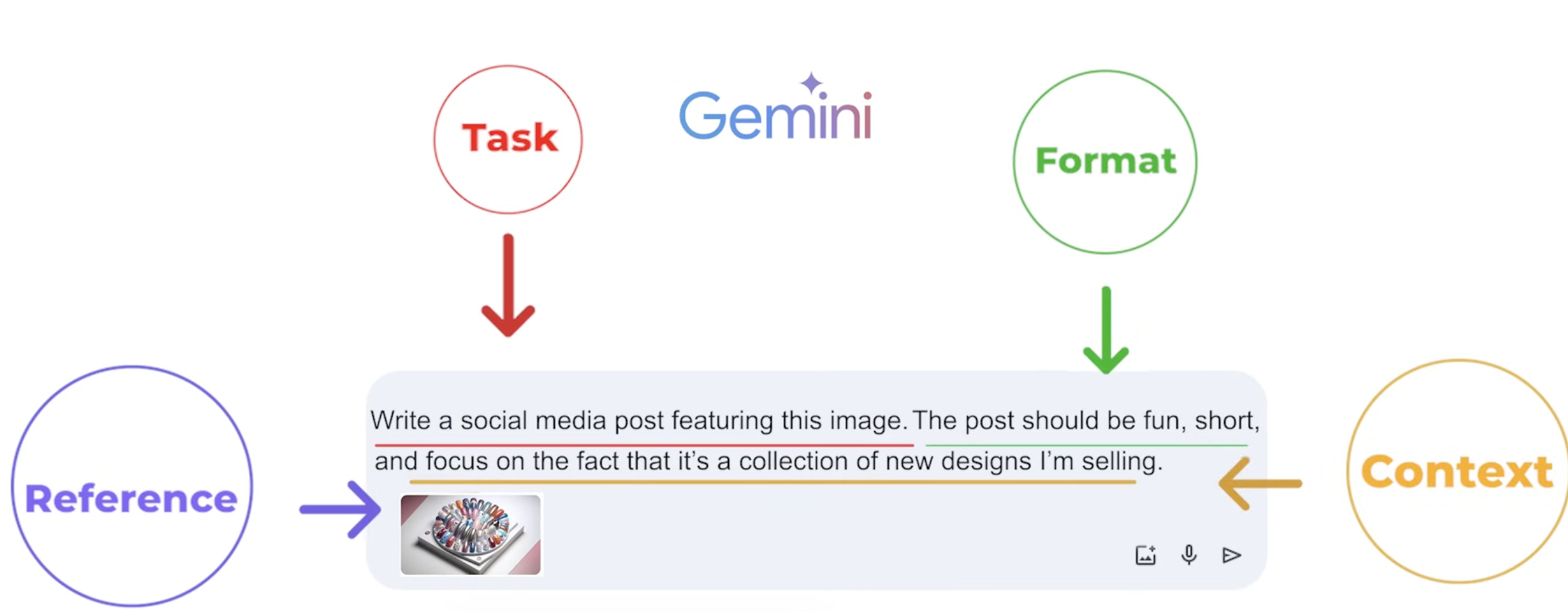
Examples of Multimodal Usage
- Suggest recipes based on a photo of the ingredients in your fridge.
- Design a visually appealing digital teaser to promote an upcoming event:
“Incorporate the brand’s logo and signature colors. The teaser should be modern and engaging, featuring the event’s key details such as the name, date, location, and a catchy tagline. Use dynamic elements, bold typography, and seamless transitions aligned with the brand’s aesthetic. Aim for a captivating teaser that sparks curiosity and encourages audience participation.”
Major Issues When Using AI Tools
Regardless of the modality, there are two significant challenges associated with using AI tools:
1. Hallucinations
Hallucinations occur when the tool provides outputs that are inconsistent, incorrect, or nonsensical. For example:
- Asking AI: “How many R’s are in the word strawberry?”
The AI might respond incorrectly with: “There are 2 R’s in strawberry.”
2. Biases
AI systems, trained on human-generated content, often inherit biases present in that content. These biases can include those related to gender, race, and more.
Mitigating Issues
To address these problems, a human-in-the-loop approach is recommended. Always review and verify the AI-generated outputs to ensure accuracy and fairness.
Using AI Responsibly
When leveraging AI tools, it is your responsibility to ensure that the outputs are accurate, ethical, and appropriate. Here’s a checklist for responsible AI use:
- Evaluate Suitability: Ensure AI fits the task and doesn’t reinforce harmful biases.
- Get Approval: Obtain company consent before using AI on projects.
- Protect Privacy: Use secure tools and avoid exposing sensitive data.
- Validate Outputs: Review all AI-generated content before sharing.
- Be Transparent: Disclose AI use to teams and clients.
By adhering to this checklist, you can ensure that AI is employed responsibly, fostering trust and promoting ethical practices.
Design Prompts for Everyday Work Tasks
This section provides examples of use cases based on the 5-step framework and iteration methods to show how generative AI tools can assist with daily work tasks.
Prompt Library
One common use case for generative AI is content production. For instance, writing emails:
Example 1: Writing an Email
“I’m a gym manager and we have a new gym schedule. Write an email informing our staff of the new schedule. Highlight the fact that the M/W/F Cardio Blast class changed from 7:00 AM to 6:00 AM. Make the email professional and friendly, and short so that readers can skim it quickly.”
(See the image)
For simple emails, tone may not be critical. However, for more important content such as essays, articles, or newsletters, tone and word choice matter greatly. Instead of vague instructions like “write a casual summary,” use specific phrases such as:
“Write a summary in a friendly, easy-to-understand tone like explaining to a curious friend.”
Providing references—like past emails or articles—and asking the AI to match their tone can also improve results.
Example 2: Planning a Game Launch
“I’m a marketer for a well-known video game producer known for creating immersive story-based online video games. I’m planning the launch of a new medieval fantasy roleplaying game that follows the path of a young protagonist searching for their missing partner. The game’s primary audience is young adults. The game is reaching the end stages of development, and I need help creating a timeline before it goes live. Provide a rough timeline for the year leading up to its launch. Also, provide some pre-launch ideas to help generate buzz around the game.”
Example 3: Scheduling Staff Shifts
*“I have 10 employees. Their employee numbers are 1 through 10. Create a table that tracks weekly staffing. Create columns for day, name, and shift (morning or afternoon).
- Employees should not be scheduled for a morning shift on the following day after they were scheduled for an afternoon shift.
- Employees should not be scheduled for both the morning and afternoon shifts on the same day.
- Every employee should have roughly the same number of total shifts per week.”*
Speed Up Data Analysis
Generative AI can significantly streamline data analysis tasks, from creating new columns to understanding complex formulas. Here’s an example of how you can leverage AI to enhance your data workflows:
Example Dataset
Download the dataset from the following URL:
StoreData.xlsx
This dataset contains information about a grocery store chain, including store details, areas, items available, daily customer counts, and store sales.
Prompts for Data Analysis
-
Calculate Average Sales Per Customer:
Prompt:
“Attached is an Excel sheet of store data. How can I create a new column in Sheets that calculates the average sales per customer for each store?”This helps generate the formula or logic needed to compute average sales per customer.
-
Analyze Relationships in the Data:
Prompt:
“Give me insights into the relationship between ‘Daily Customer Count,’ ‘Items Available,’ and ‘Sales’ based on the given data.”This can reveal patterns, trends, or correlations between variables.
Understanding Complex Formulas
AI tools can also demystify intricate formulas. For example:
Prompt:
“I work at a large restaurant and I need to order inventory while my coworker is on leave. They left me with a formula to calculate how much food to order, but I don’t understand it:
=IFERROR(ROUNDUP(MAXO, VLOOKUP(B2, Inventory!A:B,2,FALSE)0.2 - C2) + SUMIFS(Reservations!D:D, Reservations!A:A, “>=“&TODAY(), Reservations!A:A, “<“&(TODAY()+7), Reservations!C:C,B2) 0.12), “Check Inventory”).
Explain what the formula means in simpler, step-by-step terms.”
By breaking it down, AI can clarify each component, helping you understand its purpose and application.
Generative AI can transform mundane data analysis into a faster and more efficient process, allowing you to focus on deriving insights and making decisions
Building Presentations
Generative AI can be a powerful tool for designing and structuring professional presentations. From organizing content to generating visual elements, it simplifies the process and allows you to focus on delivering your message effectively.
How Generative AI Can Help
- Organizing Content: Use AI to outline your presentation structure, ensuring logical flow and completeness.
- Creating Visuals: Generate custom images, graphics, or charts to enhance the visual appeal of your slides.
- Writing Slide Content: Craft concise and impactful slide text tailored to your audience.
- Design Suggestions: Get recommendations for layouts, color schemes, and fonts to match your presentation’s theme.
Example Prompts
Structuring a Presentation
*“I’m a product designer at a headphones brand. I’m putting together a presentation for my team about what new features should be included in our next product line. The presentation includes findings from our market research on features that our 18-to-34-year-old customers want their headphones to have. These features include new colors, the ability to control playback with head movements, and noise-canceling capabilities.
Consider the relationship between our demographics’ disposable income and their most important considerations when buying headphones. How should I structure my presentation? List each slide’s topic with its key points and visuals.”*
Creating Visuals for the Presentation
“Generate close-up images of a pair of sleek, silver headphones on a desk in a college dorm room. They should have musical notes floating around the headphones to show that they’re playing music.”
Generative AI transforms the process of building presentations by offering creative support, reducing the effort required, and enhancing the overall quality of your slides. It enables you to deliver compelling, visually engaging presentations with ease.
Use AI as a Creative or Expert Partner
Generative AI can be leveraged not only as a tool but as a creative or expert partner to enhance problem-solving, content creation, and skill-building. By using advanced prompting techniques and AI agents, you can unlock innovative ways to collaborate with AI.
Advanced Prompting Techniques
Prompt Chaining
Prompt chaining guides the AI tool through a series of interconnected prompts, adding layers of complexity along the way.
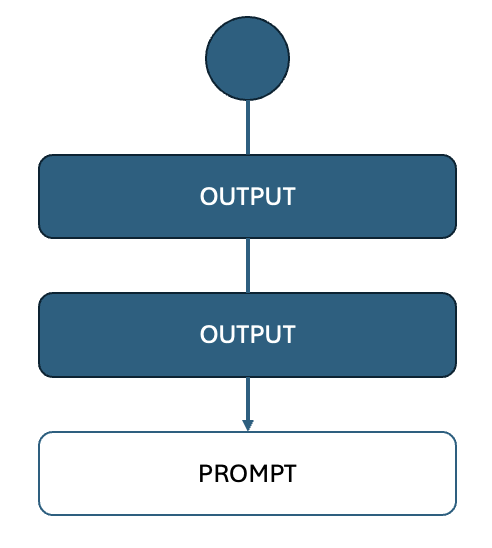
Example Scenario:
You’re an author who has written a novel and now needs a marketing plan.
-
Generate Summaries:
Prompt:
“Generate three options for a one-sentence summary of this novel manuscript. The summary should be similar in voice and tone to the manuscript but more catchy and engaging.”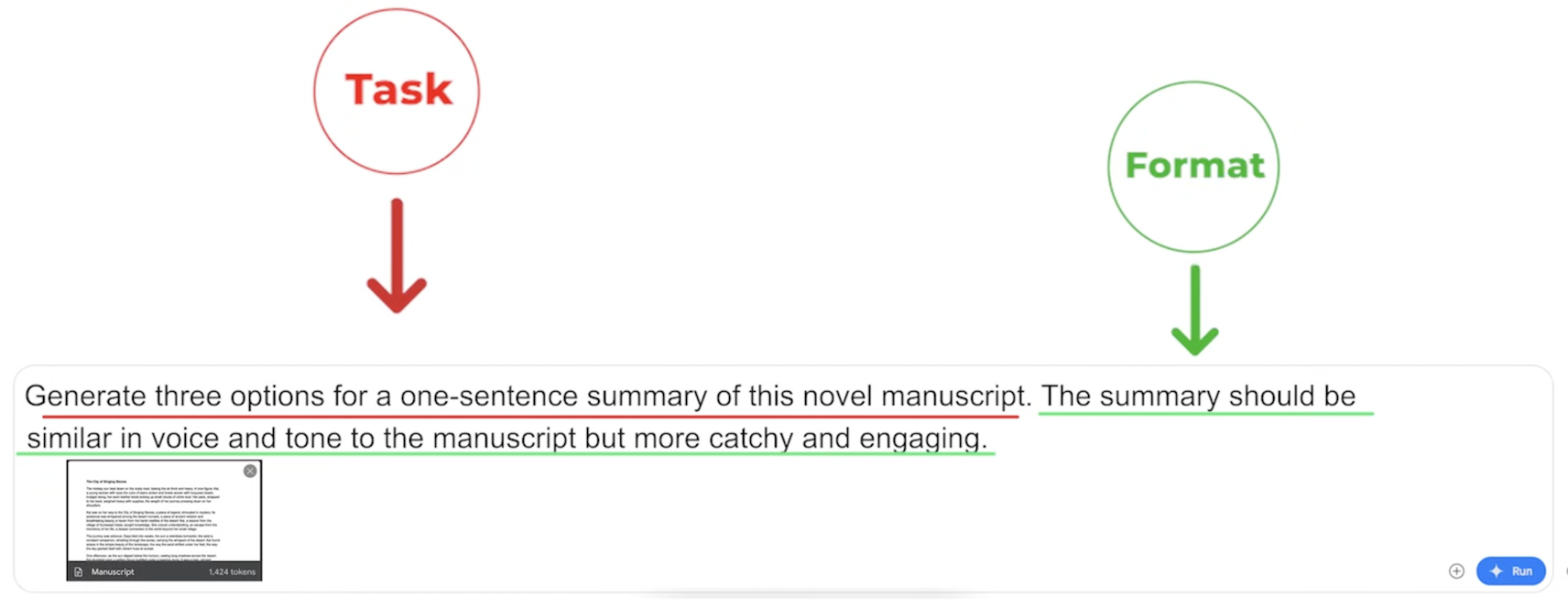
-
Create a Tagline:
Prompt:
“Create a tagline that is a combination of the previous three options, with a special focus on the exciting plot twist and mystery of the book. Find the catchiest and most impactful combination. The tagline should be concise and leave the reader hooked and wanting to read more.”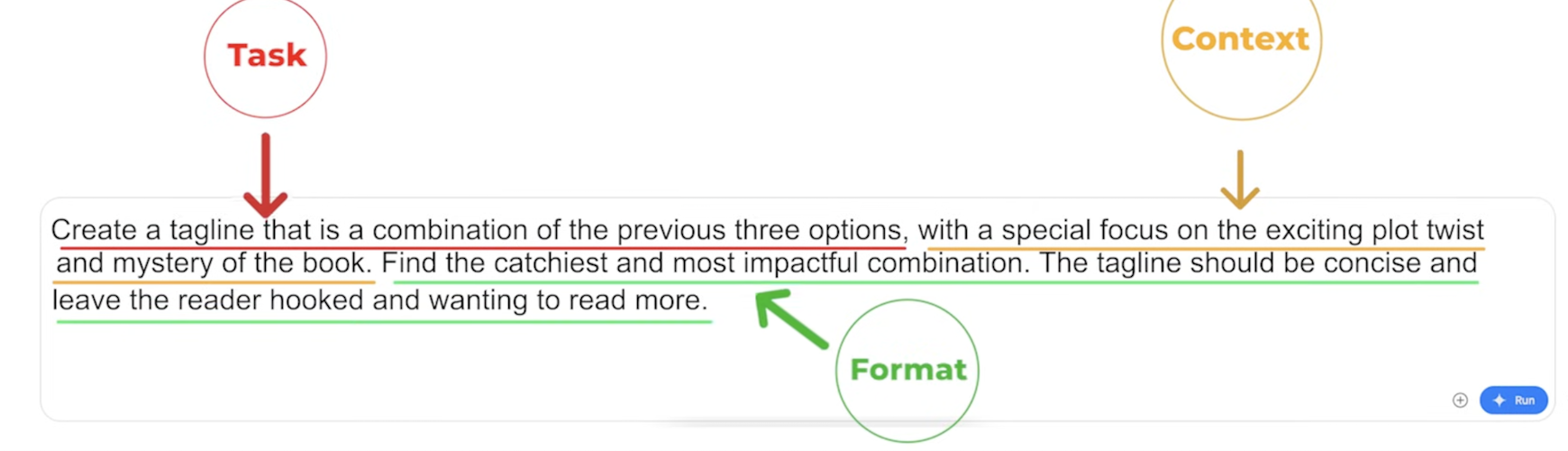
-
Design a Marketing Plan:
Prompt:
“Generate a six-week promotional plan for a book tour, including what locations I should visit and what channels I should utilize to promote each stop on the tour.”
Chain of Thought Prompting
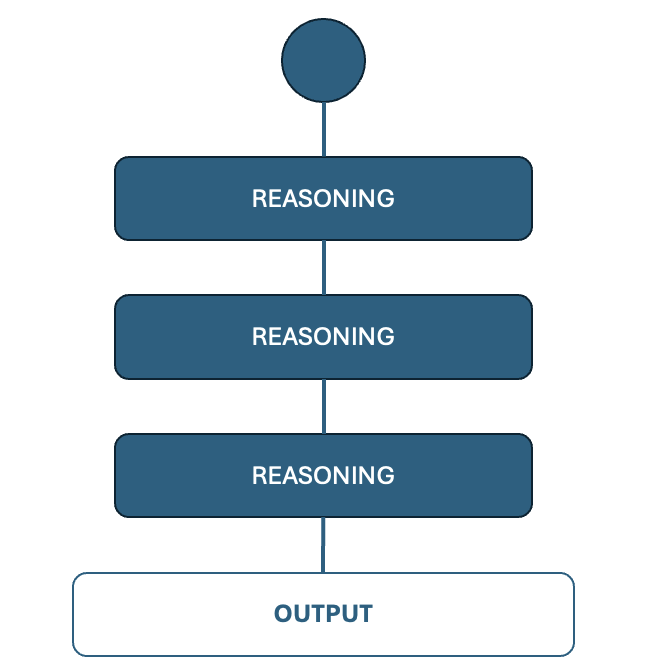
Chain of thought prompting involves asking AI to explain its reasoning step by step. This is especially useful for identifying errors and improving decision-making.
Prompt:
“Explain your thought process step by step.”
Tree of Thought Prompting
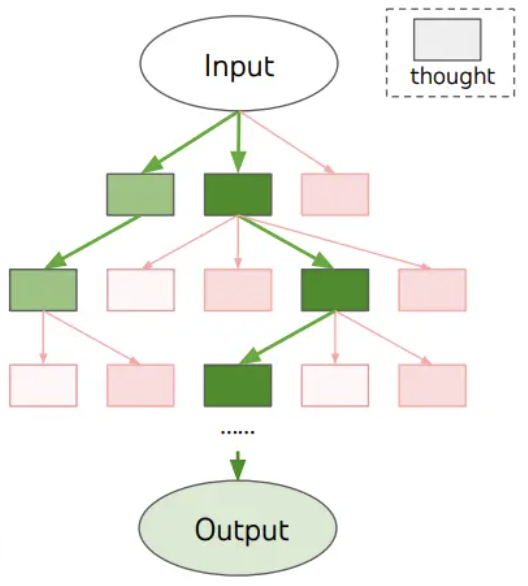
Tree of thought prompting allows you to explore multiple reasoning paths simultaneously, making it valuable for abstract or complex problems.
Example Prompt:
“Imagine three different designers are pitching their design to me. Each designer writes one step of their thinking and shares it with the group. If any expert realizes they’re wrong at any point, they leave. The question is: Generate an image that’s visually energetic, featuring art supplies and computers. Show me three suggestions in different styles from simple to detailed.”
Follow-up Prompt:
“I like the first option. Expand the idea and generate three different color schemes for that concept.”
Pro Tips for Prompting
- Combine chain-of-thought and tree-of-thought techniques by asking AI to explain its reasoning at each iteration.
- Use meta-prompting: Ask AI to help you generate the next prompt when you’re stuck.
AI Agents
AI agents are specialized virtual assistants designed to help with specific tasks or provide expert feedback.
Types of AI Agents
-
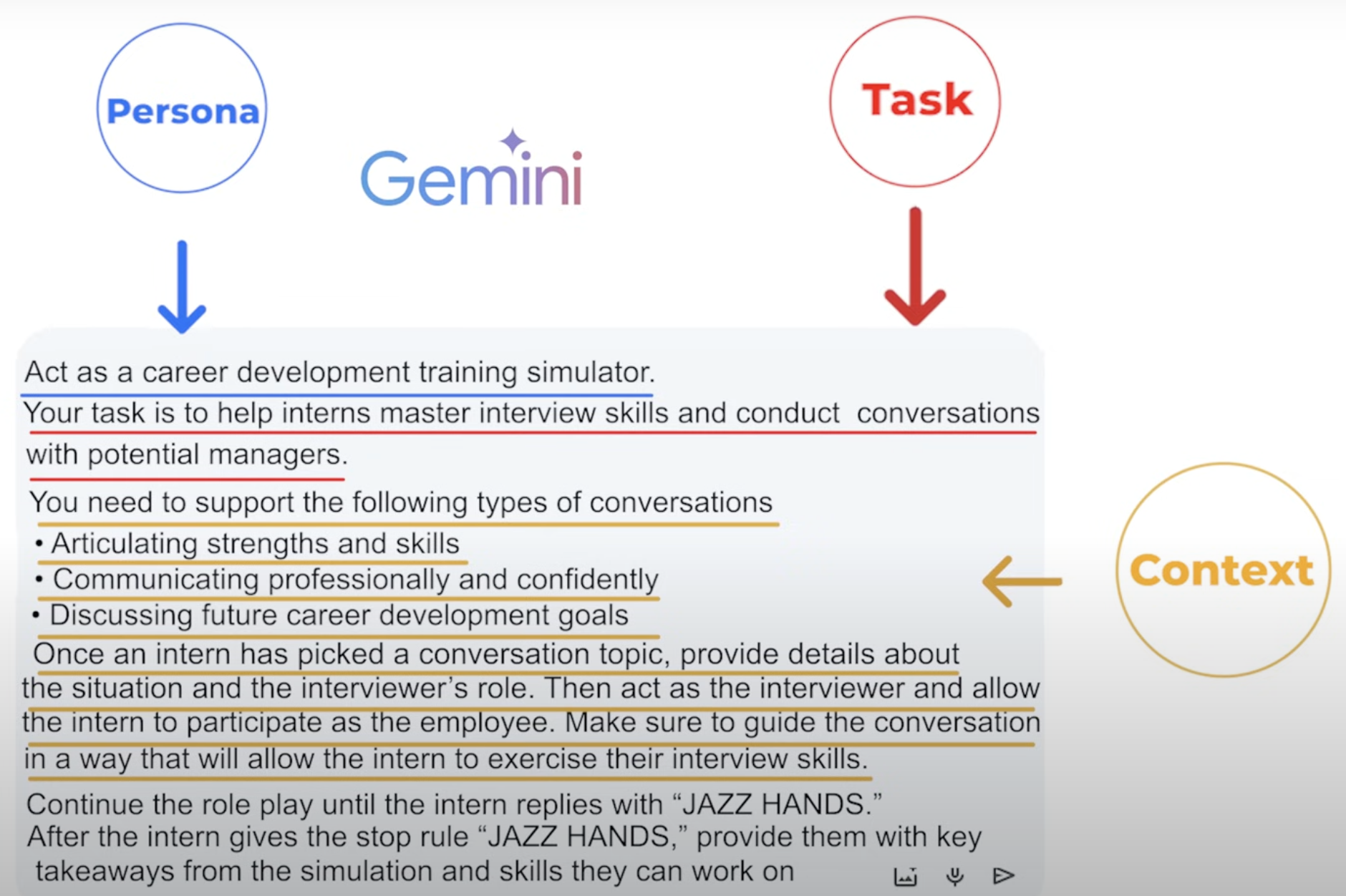
Simulation Agent (“Agent SIM”):
Simulates scenarios, such as role-playing exercises.Example Prompt:
*“Act as a career development training simulator. Your task is to help interns master interview skills and conduct conversations with potential managers. Support these types of conversations:- Articulating strengths and skills
- Communicating professionally and confidently
- Discussing future career goals
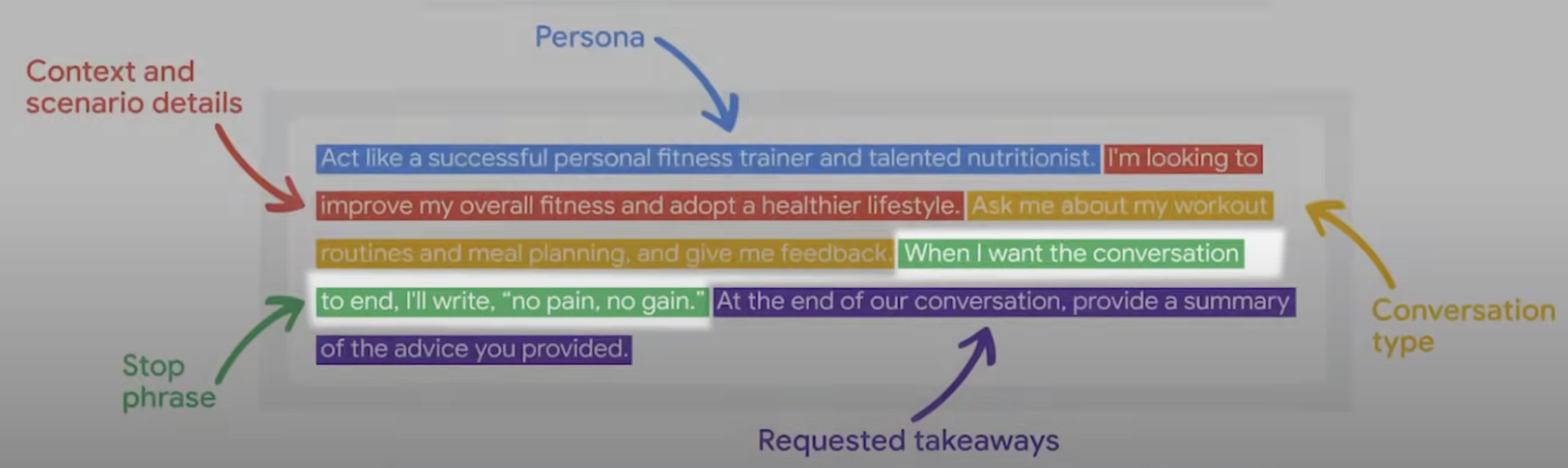
Continue the role play until the intern replies with ‘JAZZ HANDS’. Then provide key takeaways from the simulation and areas for improvement.”*
-
Expert Feedback Agent (“Agent X”):
Acts as a tutor or consultant to provide feedback.Example Prompt:
“You’re my potential client, the VP of Advertising at a world-famous sports car company known for innovation and performance. Critique my answers, ask follow-up questions, and provide feedback until I say ‘BREAK.’ Summarize areas for improvement after the session.”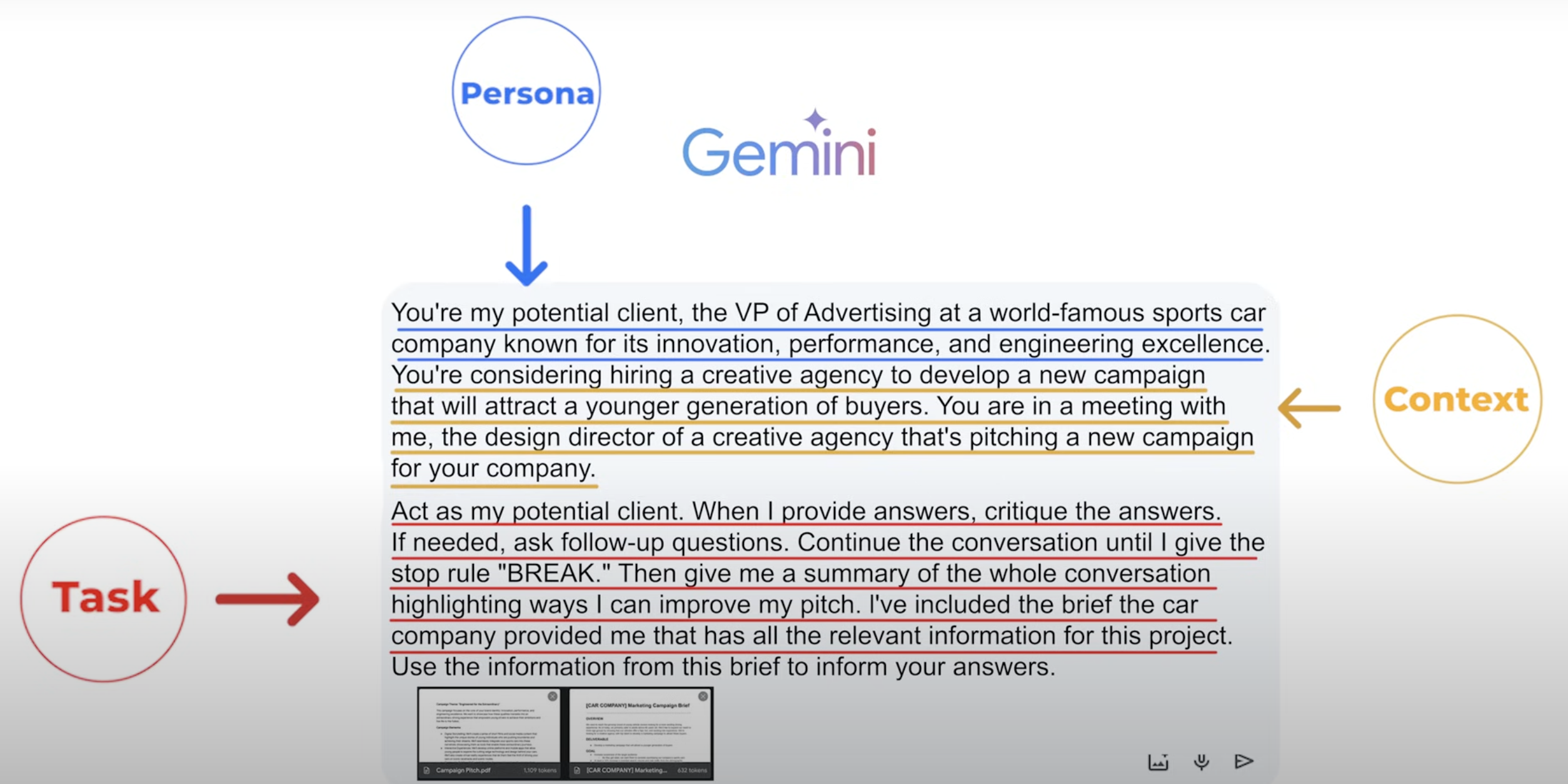
Designing Effective AI Agents
- Assign a persona to the agent.
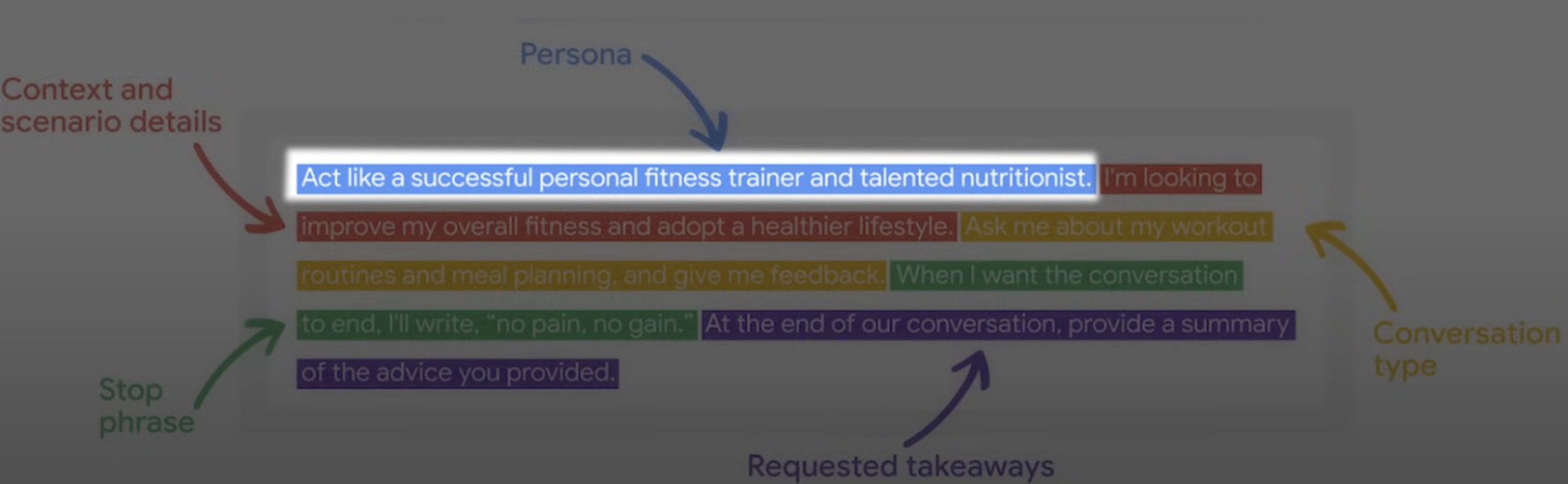
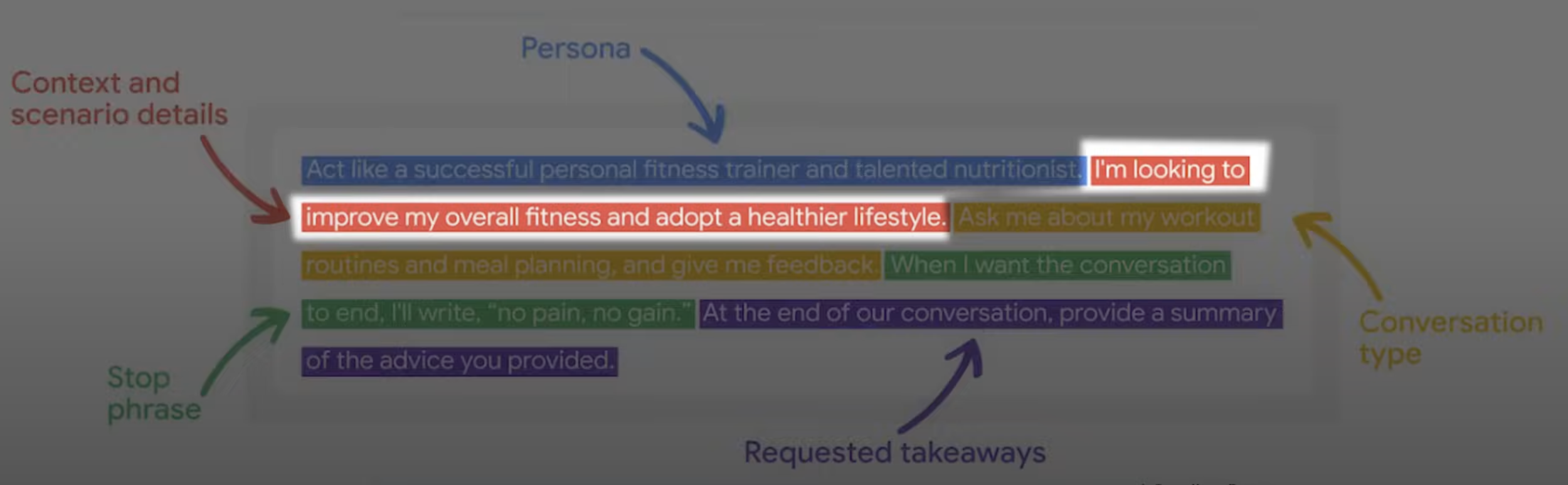
- Provide context and detail about the scenario.
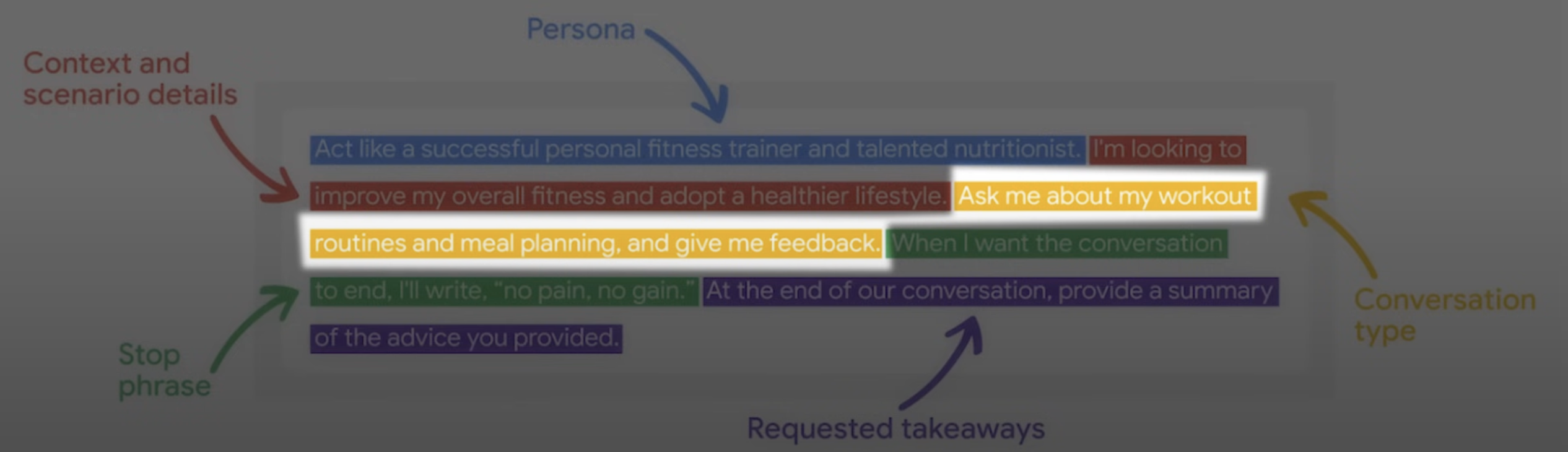
- Specify conversation types and interaction rules.
- Define a stop phrase for ending interactions.
- Request feedback after the interaction.
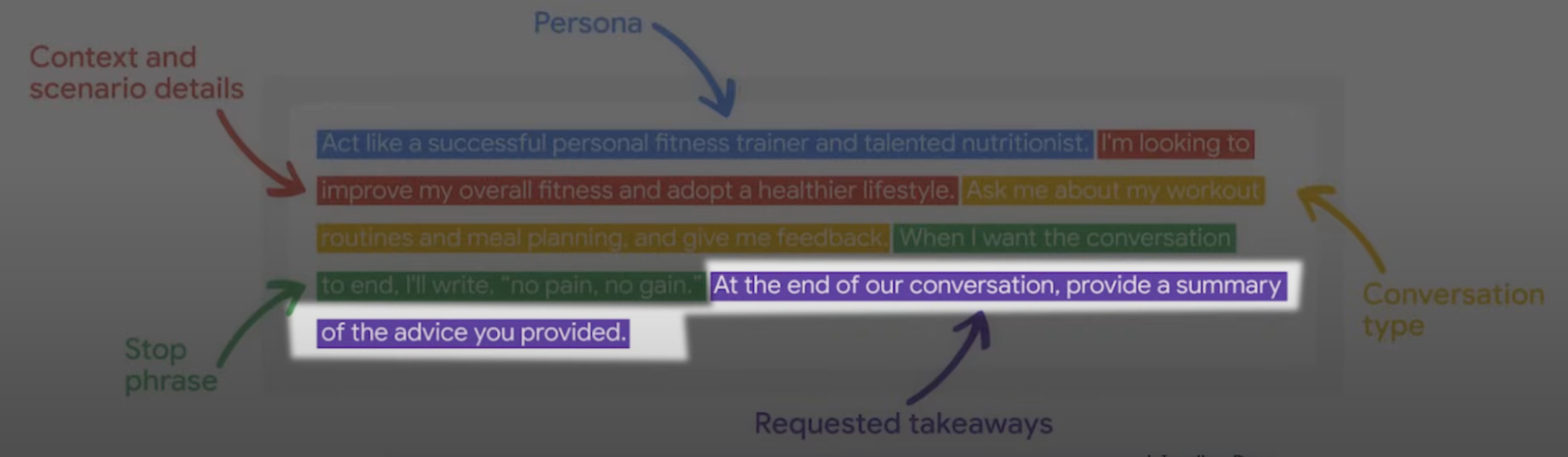
AI agents can be incredibly versatile and effective when designed thoughtfully.
Rules to Prompt Engineering
| Rules |  |
 |
|---|---|---|
| Rule-1: Ditch the fluff / Forget all the pleasantries | Can you please write me a short story about a robot and a dog who go on adventure together? | Write a short story about a robot and a dog going on an adventure |
| Rule-2: Be Descriptive - The more detail we give, the less the AI has to guess | A blog post about the economics of the Middle East in the 1960s | Write a 1000-word blog about the economic situation of Kuwait from 1961 to 1967, aimed at begineers, in a conversational tone |
| Rule-3: Context & Specifics - Specifics tell the AI what to write about, while context guides how it should write it | Write a blog post about social media marketing | Write a 1000-word blog post about digital social media marketing for beginners, using a conversational tone, targeting a general audience, and dividing it into 5 parts, each with a short list |
| Rule-4: Remember about role play | Explain the legal process for patenting an invention | You are a patent lawyer. Explain the legal process for patenting an invention in simple terms for a non legal audience |
| Rule-5: Use Limitations (Use words like: «avoid», «only» or «focus on» to set clear boundaries) | Write about renewable energy | Write a 200-word summary on the benefits of solar energy, avoiding technical jargon, and focusing on environmental advantages (or) Write a 3-paragraph article summarizing the pros and cons of wind energy for high school students. Avoid discussing financial incentives, and focus only on environmental benefits |
| Rule-6: Iterative Prompting - Instead of trying to nail the perfect prompt on your first go , you start simple and build from there | - | Prompt-1: Explain renewable energy / Prompt-2:Focus on advantages of wind energy compared to fossil fuels / Prompt-3: Rewrite the explanation for a 10-year old audience, using simple language and examples / Single Prompt: Explain renewable energy, focusing on the advantage of wind energy compared to fossil fuels, for a 10-year-old audience, using simple language and examples |
| Rule-7: Output formats - This can include formats like lists, tables, essays, or specific writing styles like poems, song verses, and so on | Tell me about the history of computers | Write a timeline of major events in computer history, formatted as a bulleted list. Includes 5-7 key milestones, with one sentence explaining each |
| Rule-8: Provide examples - Give AI a template | Write a chord progression in the style of the Beach Boys | Write a chord progression in the style of the Beach Boys. Here is an example |
| Rule-9: Chain-of-Thought - It’s all about structuring your prompts like a checklist or guideline | Explain the pros and cons of renewable energy | Explain the pros and cons of renewable energy by addressing the following: Environmental impact, Economic considerations, Availability and scalability, Long-term sustainability |
| Rule-10: Split huge prompts into smaller chunks - It makes manageable and also dramatically reduce erros or hallucinations | Explain the causes, effects, and potential solutions for climate change | Prompt-1: List the top three causes of climate change / Prompt-2: Describe the main effects of climate change on agriculture / Prompt-3: Suggest two practical solutions to combat climate change |
| Rule-11: Ask LLM to help you with prompting | - | Refine this prompt to make it clearer and more effective: ‘Explan the causes, effects, and potential solutions for climate change’ |
Parameters
Parameters are essentially settings you can adjust to control how an AI responds to your prompts. By tweaking these values, you can influence the behavior, creativity, and length of the AI’s responses. Each parameter plays a unique role in shaping the output.
Key Parameters and Their Functions
- Temperature:
The “randomness dial” that determines how creative or focused the AI’s responses are.- High Temperature (e.g., 1.0): Produces creative, chaotic, and unpredictable outputs.
- Low Temperature (e.g., 0.2): Results in structured, deterministic, and rule-abiding responses, akin to a straight-A student.
- Max Tokens:
Controls the maximum length of the AI’s response.- A lower value limits the output length, making it concise.
- A higher value allows the AI to provide detailed and extended answers.
- Top-p (Nucleus Sampling):
Influences the creative diversity of the response by narrowing or expanding the pool of words considered.- A value of
1.0includes all possible words (high diversity). - A lower value (e.g.,
0.3) focuses on only the most probable options, reducing randomness.
- A value of
- Top-k:
Limits the number of options the AI considers when selecting the next word.- A lower value forces the AI to pick from only the most likely words.
- A higher value increases the number of potential choices, enhancing creativity.
Practical Usage
Every language model handles parameters differently, so the syntax for specifying them varies:
- In ChatGPT/Claude/Gemini, parameters are formatted like
temperature:0.7. - In Mistral, parameters use an equal sign, e.g.,
temperature=0.7.
By mastering these parameters, you can fine-tune the AI to suit a variety of tasks, from creative writing to technical problem-solving.
Image Generation
Image generation with AI is an incredible blend of creativity and technology. At its core, it uses diffusion—an AI process that refines noise bit by bit, turning chaos into something stunning.
Example:
The Batmobile stuck in Los Angeles traffic, impressionist painting, wide shot
Prompting for Image Generation
When crafting prompts for image generation, think of it as describing exactly what you want to see rather than dictating how to draw it. To get the most jaw-dropping results, use the “secret sausage” structure: clear, detailed instructions that cover every aspect of your desired image.
The 3-Step Framework for Killer Image Prompts
- Subject:
The foundation of your image, like the main character of your visual story. This is usually a noun (dog, spaceship, guitar, waterfall).- For better results, spice it up with adjectives.
- Example: A fluffy black cat with glowing green eyes
- Description:
Add context—what’s your subject doing? How are they doing it? What’s happening around them? Details make all the difference.- Example: A red dragon soaring through stormy clouds, lightning illuminating its scales as it breathes fire into the night
- Style/Aesthetic:
Think of this as picking the filter for your image. Decide how you want it to look:- Is it a photo or a painting?
- What’s the art style (impressionist, surreal, 3D render, etc.)?
- Example: A 3D render of a futuristic cityscape at sunset with neon lights glowing
Key Tips for Crafting Prompts
- Be as specific as possible to avoid ambiguity.
- Think about the mood, color palette, and perspective (e.g., wide shot, close-up).
- Test and iterate—AI models often improve results with refined instructions.
By following this framework, you can harness AI’s power to create stunning visuals, whether for fun, storytelling, or professional projects.
Rules for image generation prompting
- Rule-1: Don’t overthink it - Descibe the image you would to a friend who’s never seen it
- - cat, urban street, cyberpunk, neon, nighttime, high quality
- - A sleek black cat perched on a rain-slicked urban street in a glowing cyberpynk city at night. Neon signs in electric blues and purples reflect off the wet pavement, casting a dreamy glow. The cat’s cybernetic eyes shimmer softly as it watches hover cars zip through the misty air in the background
- Rule-2: Find the right prompt length depending on the complexity of the image we’re trying to generate.Short Promts are like quick sketches and they are great for getting ideas down fast, medium prompts are like roof drafts balanced in creativity and control, long prompts are detailed masterpieces where you have the final say over every element
- - A snowy mountain range at sunrise, golden light hitting icy peaks, with a lone climber in the distance
- - A stunning snowy mountain range illuminated by the warm glow of sunrise. Golden light glints off icy peaks, contrasting against the deep blue shadows. A lone climber in vibrant gear scales the ridge, surrounded by an expense of untouched snow
- Rule-3: Negative prompting - You have to tell AI what you don’t want in your image. You just type “avoid” or “exclude” and then list of things you don’t want
- - Generate me an image of A serene beach scene with crystal clear water and white sand
- - Generate me an image of A serene beach scene with crystal clear water and white sand, exclude trees
- Rule-4: Resolution and quality settings. Layout - use terms like “square”, “landscape” or “portrait”
- - - - Generate me an image of a cat , 4k, high resolution, detailed textures